About This Game
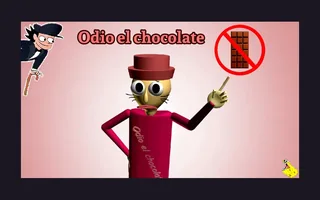
Odio el chocolate is a Baldi's Basics mod by Wantho. A box of chocolates has been scattered through the school, and something is moving between the corridors with you. Your job is simple to say and awkward to do: find all 13 pieces and get back to the exit.
The version on this page is a Unity WebGL build that streams straight into the frame above, so there is nothing to install. It is a separate browser test build rather than the creator's Windows download, which means the rules it ships with are the ones shown here rather than whatever the desktop version has since grown.
Thirteen Chocolates And A Way Out
The in-game How to Play screen states the objective plainly: the chocolates are scattered across different rooms, you need to find 13 of them, and you need to avoid the pursuer while you do it. A counter on screen tells you how many are still out there, so the run is never a guessing game about progress. What is left to you is the route.
Explore one branch of the school at a time and note a landmark before each turn. That is the difference between a run that works and a run where you spend your stamina in an empty corridor with the exit somewhere you have already been.
Four Modes, Different Pressure
The mode menu lists more than one way in. Low Cortisol Mode is the gentler option and the sensible place to learn the layout, the item slots, and the controls. Main Mode is the full run: 13 chocolates, then the exit. Baltazar Mode is an additional named mode with its own objective screen. Triple Trouble Mode is flagged as harder and is not the place to start.
Controls Worth Knowing
Move with W, A, S and D and turn with the mouse. Left mouse interacts, right mouse uses the selected item, and 1, 2 and 3 switch between your three item slots. Hold Left Shift to run and keep stamina back for the corridors that need it. Space is bound to both looking back and jumping, with the game deciding which one applies. Esc pauses. All of this comes from the build's own Menu, Options, Controls screen, and you can rebind it there. A keyboard and mouse are recommended; touch controls have not been confirmed.
Heads Up Before You Start
The opening warning lists flashing lights, jump scares and loud sounds. If the embedded player stays blank or does not take input, use the new-tab link under the frame instead of reloading in place.
How To Play
13 Chocolates
Scattered across rooms, tracked by an on-screen counter
Four Modes
Low Cortisol, Main, Baltazar, and Triple Trouble
Item Slots
Three slots, selected with the number keys
Desktop Build
Keyboard and mouse, with a Unity WebGL stream
Wait for the progress bar, then click the canvas so the keyboard goes to the player.
Start with Low Cortisol Mode and learn the corridors before chasing the full objective.
Collect the chocolates one branch at a time and confirm the counter moves.
With all 13 collected, follow the exit cue and save your sprint for the way out.




















Player Notes
0